

Quickstart
This guide will walk you through creating your first scenario with Giskard Checks in under 5 minutes.
A simple example
Section titled “A simple example”Let’s consider a simple question-answering bot. We want to test that the answers of our bot are correct according to some context information.
In the checks framework, you test a Trace. A Trace is an immutable
record of everything exchanged with the system under test (SUT). It
contains one or more Interactions, where each Interaction
corresponds to a single turn (inputs + outputs).
For our simple Q&A bot, we can represent a single turn as a trace with just one interaction. The inputs and outputs can be anything the bot supports, as long as they are serializable to JSON. For now, we’ll assume our bot takes an input string (question) and returns a string (the answer).
from giskard.checks import scenario, Groundedness
# Use the fluent builder to create a scenario with an interaction and checkstest_scenario = (    scenario("test_france_capital")    .interact(        inputs="What is the capital of France?",        outputs="The capital of France is Paris."  # generated by the bot    )    .check(        Groundedness(            name="answer is grounded",            answer_key="trace.last.outputs",            context="""France is a country in Western Europe. Its capital                       and largest city is Paris, known for the Eiffel Tower                       and the Louvre Museum."""        )    ))
In practice, we’ll get the outputs directly from the bot, or maybe from a dataset of previously recorded interactions.
Note how we created the groundedness check:
name: this is an (optional) name for the check, to make it easier to interpret the resultsanswer_key: this is the key (in JSONPath) to the answer in the trace. All JSONPath keys must start withtrace. Thelastproperty is a shortcut forinteractions[-1]and can be used in both JSONPath keys and Python code. In this case we want to check theoutputsattribute of the last interaction in the trace (this is the default)context: this is the context information that will be used to check if the answer is grounded. Note that acontext_keyis also available if we want to dynamically load the context from the trace itself (see next example).
We can now run the scenario and inspect the results. In a notebook, the
ScenarioResult renders with a rich display:
result = await test_scenario.run()result
Dynamic interactions
Section titled “Dynamic interactions”So far, we’ve used static values for inputs and outputs. In practice, you’ll often want to generate outputs dynamically by calling your SUT, or generate inputs based on previous interactions.
You can pass callables (functions or lambdas) to interact() instead of
static values:
from openai import OpenAIfrom giskard.checks import scenario, Groundedness
client = OpenAI()
def get_answer(inputs: str) -> str:    response = client.chat.completions.create(        model="gpt-5-mini",        messages=[{"role": "user", "content": inputs}],    )    return response.choices[0].message.content
test_scenario = (    scenario("test_dynamic_output")    .interact(        inputs="What is the capital of France?",        outputs=get_answer    )    .check(        Groundedness(            name="answer is grounded",            answer_key="trace.last.outputs",            context="France is a country in Western Europe..."        )    ))
No need to precompute outputs anymore. This is especially useful in multi-turn scenarios, where inputs or outputs depend on earlier interactions (see Multi-Turn Scenarios).
Structuring the interactions
Section titled “Structuring the interactions”As mentioned above, in practice the interaction inputs and outputs can take any form as long as they are serializable to JSON. For example, our bot could take input in the form of an OpenAI message object and return a structured output like this:
{ "answer": "The capital of France is Paris.", "confidence": 0.93, "documents": [ "France is a country in Western Europe. Its capital and largest city is Paris, known for the Eiffel Tower and the Louvre Museum.", "The Eiffel Tower is a wrought-iron lattice tower in Paris. It was completed in 1889." ]}We can easily create a trace based on this format, and adapt our scenario:
from giskard.checks import scenario, GreaterThan, Groundedness
test_scenario = (    scenario("test_structured_output")    .interact(        inputs={"role": "user", "content": "What is the capital of France?"},        outputs={            "answer": "The capital of France is Paris.",            "confidence": 0.93,            "documents": ["France is a country in Western Europe. Its capital and largest city is Paris, known for the Eiffel Tower and the Louvre Museum.", "The Eiffel Tower is a wrought-iron lattice tower in Paris. It was completed in 1889."]        }    )    .check(        Groundedness(            name="answer is grounded",            answer_key="trace.last.outputs.answer",            context_key="trace.last.outputs.documents",        )    )    .check(        GreaterThan(            name="confidence is high",            key="trace.last.outputs.confidence",            expected_value=0.90,        )    ))
Note how this time we used context_key to obtain the context from the
documents present in the trace itself. This is a common case for RAG
systems. We also added a check to ensure the confidence is high.
We can now run the scenario and inspect the results. In a notebook, the
ScenarioResult renders with a rich display:
result = await test_scenario.run()result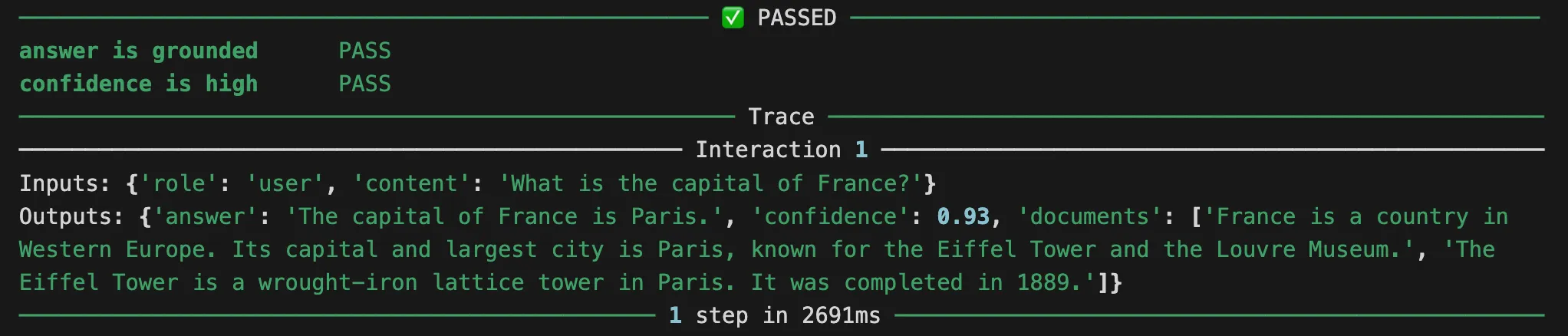
This will give us a result object with the results of the checks.
Check out the Multi-Turn Scenarios guide for more details on how to test multi-turn scenarios.